How to Measure Rifle Groups From a Photo
You don't need a second app to score a target. Photograph it, tap your shots, and Loadscope measures the group for you — then scores it against the rest of your ladder.
A chronograph tells you what your velocity did. The target tells you what your rifle did with it. To turn a paper target into a number you can compare, you've always had two choices: measure it by hand with a ruler and calipers, or shoot it through a separate target app and import the CSV. Loadscope's built-in Measure Target gives you a third way — one that lives in the same place you score your load.
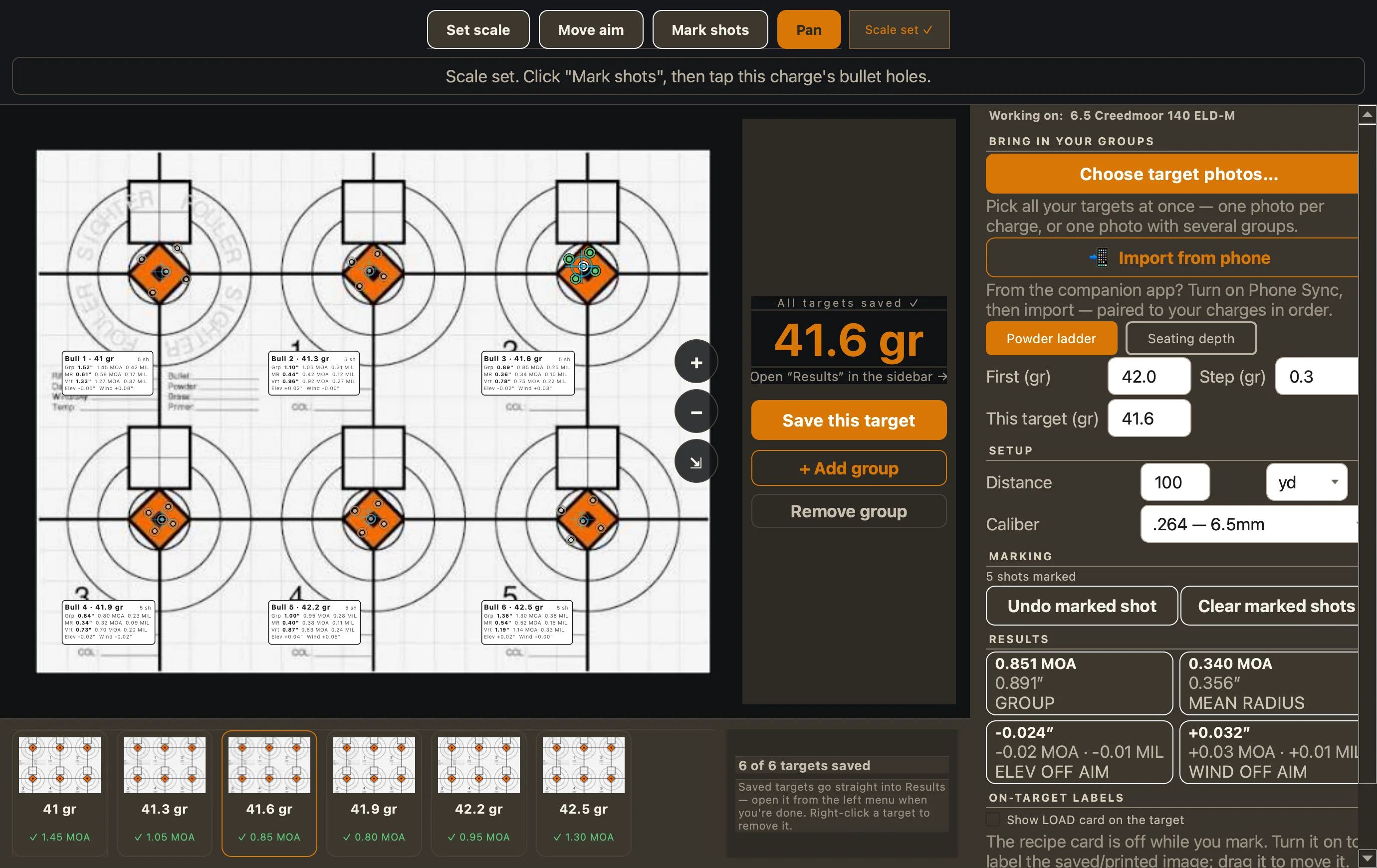
How it works
- Take a photo of your target with your phone, or scan it.
- Set the scale. Click two points a known distance apart — the width of the bull, a 1" grid square, a ruler laid on the paper — and tell Loadscope how far apart they really are. That's what makes every measurement real inches, not pixels.
- Mark your aim point and tap each shot. Drop a hole on every impact, then drag any one to place it precisely. Loadscope does the geometry.
- Read the group. Group size, mean radius, vertical spread, and how far the group sits off your aim — in both MOA and mils.
Why mean radius, not just group size
Extreme spread — the widest two shots — is the number everyone quotes, and it's the one a single flier ruins. Mean radius is the average distance of every shot from the group's center, so it describes what the load actually does instead of what its worst round did. Loadscope shows you both and scores on mean radius, with group size as the fallback when that's all you have. More on how it scores →
Measure a whole ladder on one target
Shoot your ladder across one target sheet — a separate bull for each powder charge, or each seating depth — and you can measure every one in a single pass. A Powder/Seating toggle tells Loadscope which test you're running; you tell it which bull is which, and it doesn't need to read your handwriting. Each group lands in your scored results under its powder charge or depth, and the best load is named on the Results page — which weighs the velocity flat-spot and shot-to-shot SD too, not just the smallest group.
From the bench or from the field
Measure at your desk after the range trip, or measure on the Loadscope Ballistics iPhone app while the target's still in front of you and the wind's still in your memory. From the phone, hit Import from phone on the desktop and the groups drop straight into the load over your own Wi-Fi — paired to your ladder in shot order. No retyping, no second app, no CSV to chase down. Just want a group number and nothing else? There's a free, standalone Loadscope Measure app that does only that.
Score your target without a second app
Loadscope reads your chronograph, measures your target groups from a photo, scores every powder charge and seating depth you tested, names your best load, and prints a range card — on Mac and Windows. One app, bench to best load.
See how it works →